The posted general ledger is the only accounting truth. Official statements and the Finance Dashboard read it; the VAT return checks its document-based calculation against it. Records imported from an old system are shown as Historical / unverified and are brought in only through Opening Balances.
Finance pages need finance permissions; exports, manual journals and financial-year settings each need their own permission.
Chart of accounts and general ledger
Accounting › Chart of Accounts — each account has a code, type, parent, balance-sheet group and cash-flow class. Protected system accounts cannot be deleted.
Finance › Reports › General Ledger — one section per account with the opening balance, every posting and the closing balance. Click the Type or Num of any row to open the source document. If you are not allowed to open the source, nothing is linked.
Journal entries
Automatic entries come from documents. For a manual journal, open Accounting › Journal Entries › New. Debits must equal credits. Posted entries are never edited — correct them with a reversal, which keeps the history.
Financial statements
Trial Balance, Balance Sheet, Profit & Loss, Cash Flow and Changes in Equity share one toolbar: report period, from / to, compare to, then Customize (rows, number format, section titles — display only). Account names open the general ledger for that account and period.
VAT periods and the VAT return
Set your periods once in Finance › Financial Year › VAT tax periods, copying them from your VAT registration certificate. The financial year is set separately.
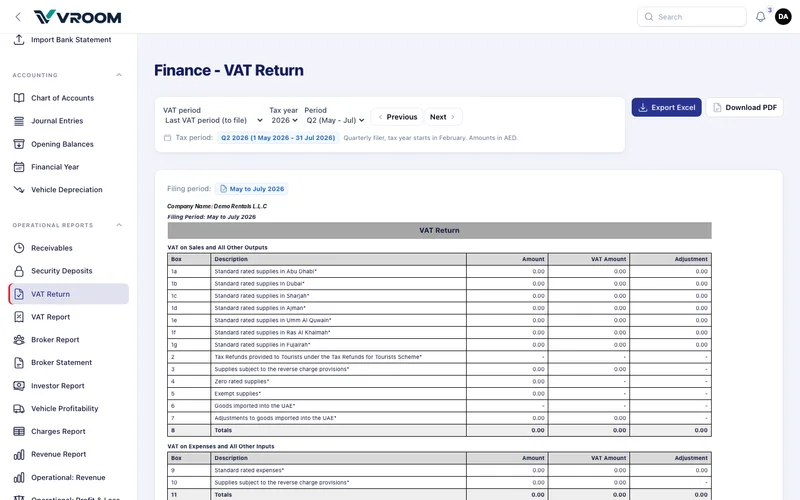
In Operational Reports › VAT Return:
- Choose Last VAT period (to file), Current VAT period or a tax year and period. Use Previous / Next to move.
- Custom date ranges are allowed for analysis, but a range that is not exactly one tax period is flagged analysis only — do not file.
- Boxes 1a–1g show standard-rated sales by emirate; 4 zero-rated; 5 exempt; 8 totals; 9 purchases with recoverable VAT; 12–14 due, recoverable and payable.
- 0% lines without a VAT type are listed separately and are in no box. Fix them before filing.
- Check against the ledger compares the return with Output VAT and Input VAT for the same documents and explains any difference.
VROOM helps you prepare the return from your records. Filing remains your responsibility — confirm treatments such as Salik recharges and any zero-rated or exempt supplies with your tax adviser.
Investors
Each investor arrangement is classified as a loan (a liability the company repays) or equity. After capital is posted the classification is locked; changing it uses Reclassify capital with a date and reason, which posts one journal and does not rewrite earlier periods. Profit-share settlements post to Investor Payable and are paid from the bank.
Depreciation
Per vehicle, choose straight line — (cost − residual) ÷ useful life in months — or reducing balance, where each month is the book value at the start of the month × annual rate ÷ 12, never below the residual value. Run depreciation up to [month] posts one journal; only the latest run can be undone.
Bank and opening balances
Banking — import a bank statement and match lines. Accounting › Opening Balances — bring in balances from your previous system.