Fleet & rentals · Fleet management
Know where every car stands before the phone rings.
Each vehicle has one record: plate, category, rates, papers, photos, purchase cost and depreciation. Its status comes from the agreements themselves, so "available" means available.

What it does for you
A fleet record you can trust at 8 a.m.
Statuses you never set by hand
Available, Reserved, Rented and Staff Use are worked out from the agreements. Nobody has to remember to update them, and nobody can mark a car free while it is still out.
Holds that actually block bookings
Maintenance, Workshop, Accident, Legal Hold, Unavailable, Inactive and Sold are manual holds. A car on hold cannot be booked until the hold is cleared.
Plates that stay unique
Plate source, code and number are separate fields, and the full plate must be unique. "A 12345" and "12345" with code A can no longer become two cars.
Papers and photos on the vehicle
Mulkiya, insurance, photos and any other file live in the vehicle’s Documents tab, private to your team and logged on every download.
How it works
From new car to rentable car
Add the vehicle
Fleet › Vehicles › New vehicle. Choose the maker and model, enter the plate details and pick a category such as SUV or Sedan.
Attach the papers
Upload the Mulkiya, insurance and photos in the Documents tab. Large photos are resized; evidence originals are kept.
Set rates and cost
Record rental rates and, with the right permission, purchase cost and the depreciation method.
Let the agreements drive status
From here the car’s status follows its bookings, returns and any maintenance or hold you place on it.
Also included
A fleet report that arrives before the team does
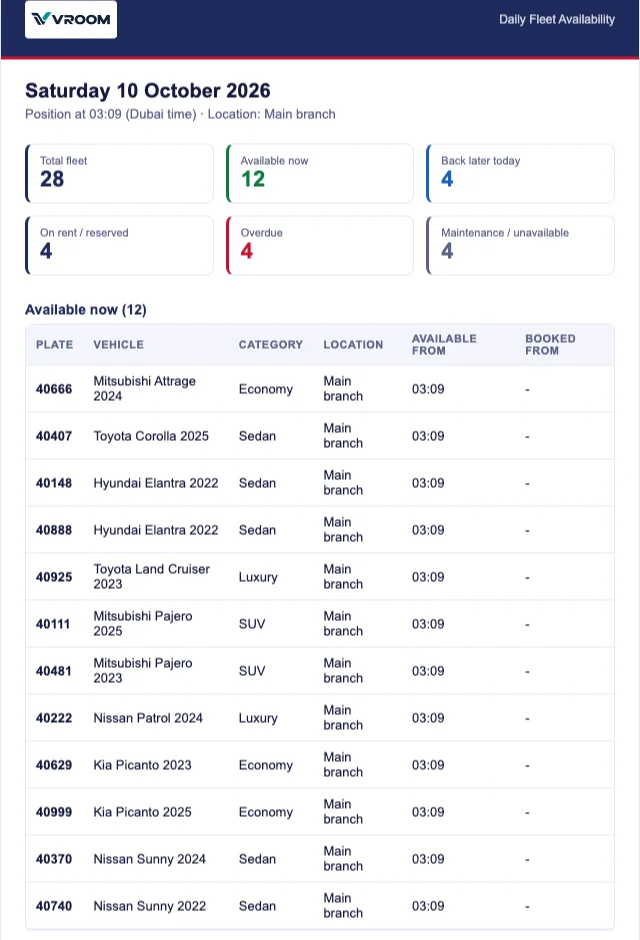
Every morning the administration team can receive the fleet position by e-mail, and as a PDF on WhatsApp once the WhatsApp connection is live: cars available now, cars due back today, and cars on rent, overdue or off the road. No customer details are included.
In detail
What’s included
On every vehicle
- Maker, model, year and category
- Plate source, code and number (unique)
- Rental rates
- Photos and papers in a private Documents tab
- Purchase cost and depreciation schedule (permission-based)
- Maintenance records that block their dates
Fleet views
- Fleet right now bar on the dashboard
- Availability calendar with day, week, 2-week and month views
- Daily fleet availability report by e-mail and WhatsApp
- Vehicle profitability report
- GPS tracking when Pilot GPS is connected
A car that is expected back is shown separately. It becomes free only when staff record the return on the agreement, so the counter never promises a car that is still on the road.
Can I see which cars are off the road and why?
Yes. Manual holds carry a reason such as Maintenance, Workshop or Accident. They appear on the calendar, the dashboard and in the daily report’s maintenance / unavailable section.
Does VROOM track depreciation per car?
Yes. Each vehicle can use straight-line or reducing-balance depreciation. A monthly run posts one journal and the vehicle’s Depreciation tab shows each month and net book value by year.
Who can see purchase prices?
Only roles with the depreciation permissions. Everyone else with fleet access sees the operational record without the cost figures.
Connected to
Works hand in hand with
Next step
See your own rental workflow in VROOM.
Book a live demo and we will walk through a rental from booking to the financial statements, using demonstration data.