Billing & finance · Accounting & finance
From rental agreement to financial statement, everything stays connected.
Invoices, payments, approved expenses and supplier bills post to a real general ledger as the work happens. Your accountant reviews and adjusts; nobody re-keys rentals into a second system.
| Date | Type | Num | Memo | Debit | Credit | Balance |
|---|---|---|---|---|---|---|
| 15 Oct | Invoice | INV-000231 | Sample Customer 12 | 378.00 | 378.00 | |
| 15 Oct | Payment | PAY-000118 | Sample Customer 12 | 378.00 | 0.00 |
| Date | Type | Num | Memo | Debit | Credit | Balance |
|---|---|---|---|---|---|---|
| 15 Oct | Invoice | INV-000231 | Kia Picanto 2025, 3 days | 360.00 | (360.00) |
| Date | Type | Num | Memo | Debit | Credit | Balance |
|---|---|---|---|---|---|---|
| 15 Oct | Invoice | INV-000231 | VAT 5% | 18.00 | (18.00) |
Click Type or Num to open the source document.
What it does for you
Real accounting, not a revenue spreadsheet
The ledger is the single truth
Official statements and the finance dashboard read the posted general ledger. The VAT return checks its document-based figures against it and explains any difference.
Corrections keep history
Posted entries are never edited. Mistakes are corrected with a reversal, so the audit trail stays intact.
Click any figure to see why
Statement lines open the general ledger; ledger rows open the invoice, payment, bill, expense, fine or toll behind them — where your permissions allow.
Know what each vehicle actually earns
Rental income, linked costs and depreciation come together in vehicle profitability, without a separate spreadsheet.
How it works
How a rental reaches the books
Postings follow the documented rules. Amounts are synthetic.
Invoice saved
Dr Accounts Receivable 378.00 / Cr Rental Income 360.00 / Cr Output VAT 18.00.
Payment recorded
Dr Bank 378.00 / Cr Accounts Receivable 378.00.
Expense approved
Dr Expense (net) and Input VAT / Cr Bank or Cash.
Statements updated
Trial balance, P&L, balance sheet and VAT return reflect the postings for the period.
Also included
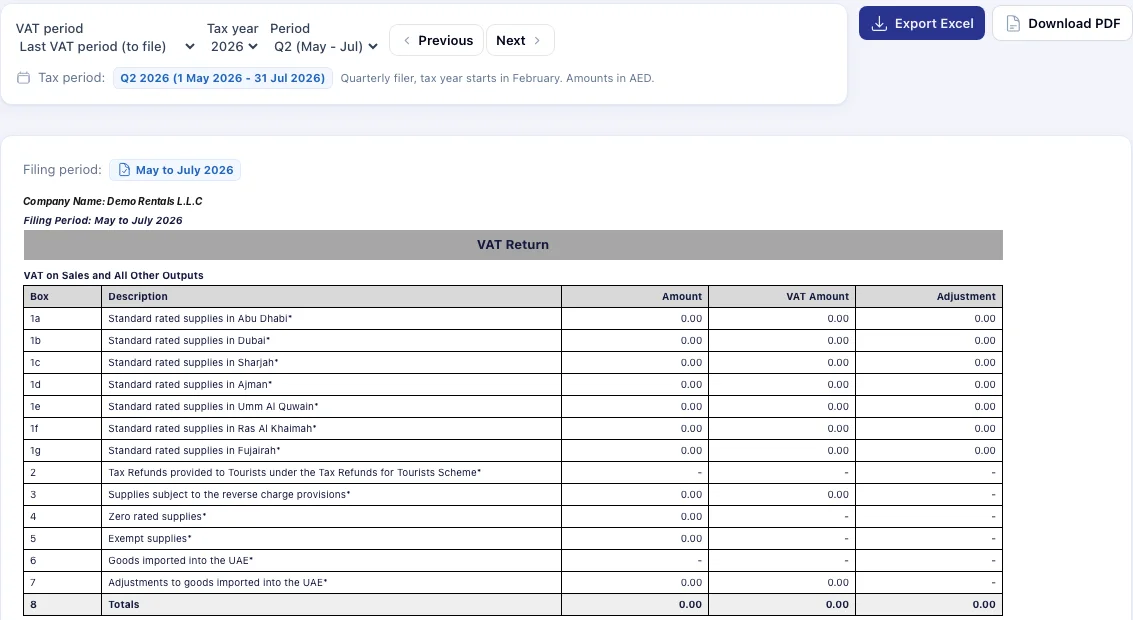
A VAT return set up around your FTA periods
Copy your FTA-assigned tax periods once. The VAT return then selects the right period, fills the boxes from your documents, lists 0% lines that still need a VAT type, and checks itself against Output VAT and Input VAT in the ledger.
In detail
What’s included
Ledger and statements
- Chart of accounts with protected system accounts
- General ledger with running balances and drill-down
- Balanced manual journals, corrected by reversal
- Trial balance, profit & loss, balance sheet
- Statement of cash flows and changes in equity
- Compare-to periods and display-only customisation
Receivables, payables and tax
- Receivable and payable ageing
- VAT tax periods and VAT return by box, emirate by emirate
- Ledger comparison for Output VAT and Input VAT
- Bank statement import and matching
- Opening balances and financial year settings
Fleet-specific accounting
- Vehicle depreciation: straight line or reducing balance
- Investor capital as loan or equity, with dated reclassification
- Investor profit-share settlements
- Pass-through accounting for fines and tolls (switched on by date)
- Income classification for rental, recoveries and retained deposits
VROOM helps you keep books and prepare the VAT return from your records. Filing remains your responsibility; confirm treatments with your accountant or tax adviser. VROOM does not claim government certification.
Questions
Accounting & Finance: common questions
Something else? Ask our team or read the Help Center.
What about records from our old system?
Imported historical records are shown as Historical / unverified and are not posted. Balances are brought in through Opening Balances, so the new ledger starts clean.
Can our accountant post adjustments?
Yes, with the manual journal permission. Debits must equal credits, and posted journals are corrected with a reversal.
Is the financial year the same as the VAT period?
No. They are set separately, so a February-start quarterly VAT cycle can sit alongside a calendar financial year.
Connected to
Works hand in hand with
Next step
See your own rental workflow in VROOM.
Book a live demo and we will walk through a rental from booking to the financial statements, using demonstration data.