Interactive product tour
Explore VROOM without signing in.
Nine modules, with real screens where we have them and clearly labelled illustrations where we don’t. Tap the numbered markers to see what each part does.
01 · Dashboard
The first screen every morning
Quick actions, the fleet position and today’s work, on the same connected records.
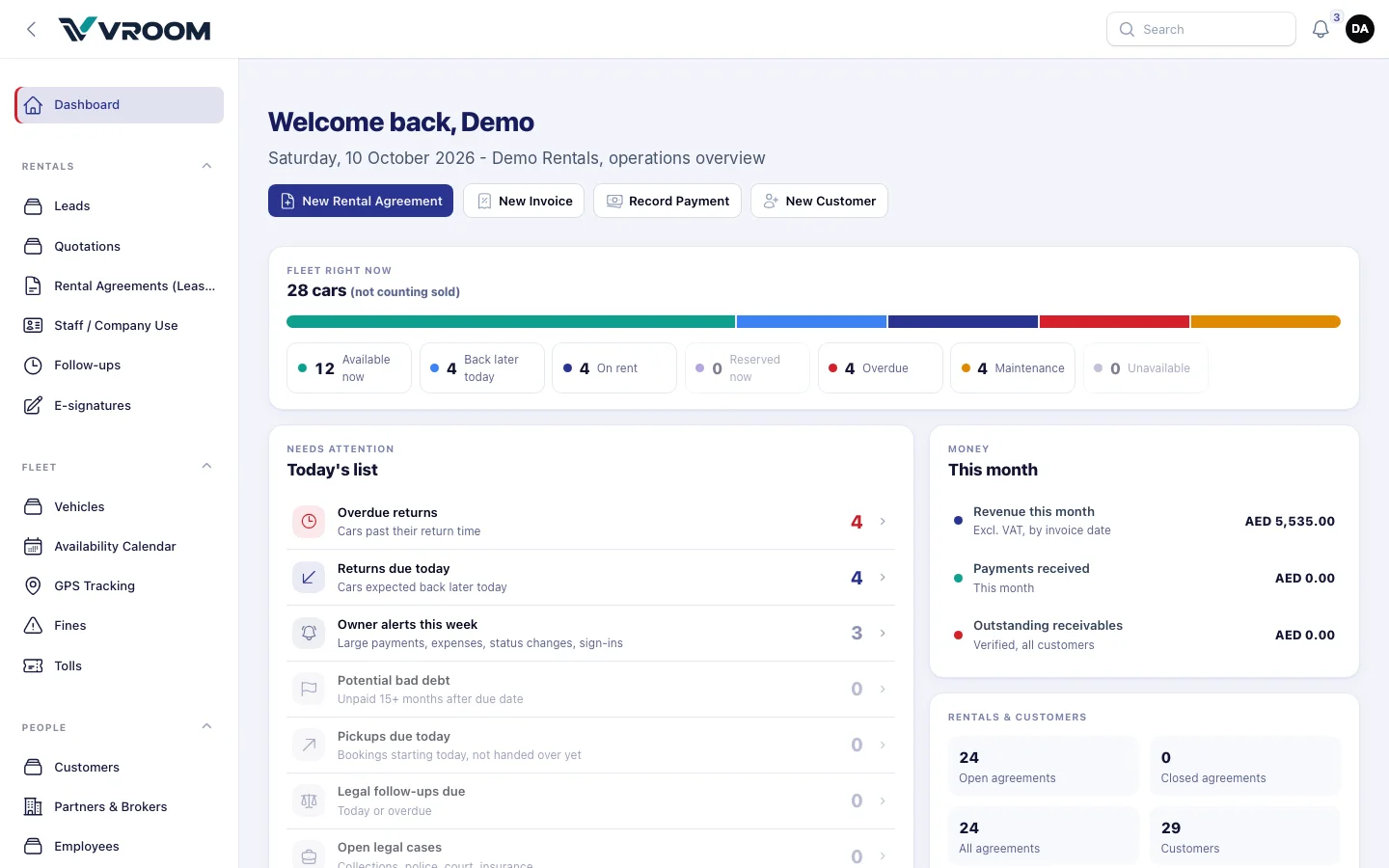
ScreenReal VROOM interface. Synthetic demonstration data; tenant branding replaced.
What you’re looking at
- 1Quick actions
New rental agreement, invoice, payment or customer in one click.
- 2Fleet right now
28 cars split into available, back later today, on rent, reserved, overdue, maintenance and unavailable.
- 3Today’s list
Overdue returns first, then returns due, owner alerts, potential bad debt, pickups and legal follow-ups.
- 4Money this month
Revenue excluding VAT, payments received and outstanding receivables.
Example workflow
- Check overdue returns
- Open a fleet segment to see the matching cars
- Use a quick action to start an agreement
02 · Fleet
The fleet position, delivered
The daily fleet availability report gives the administration team the position before the day starts. It contains no customer details.
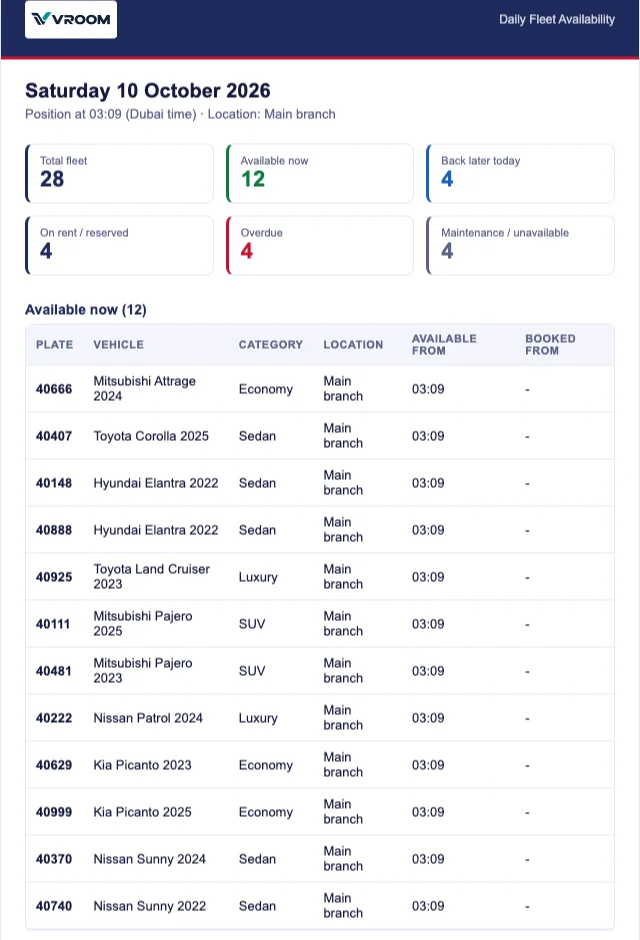
ScreenReal VROOM interface. Synthetic demonstration data; tenant branding replaced.
What you’re looking at
- 1Position and time
Report date, Dubai time and location.
- 2Counts by state
Total fleet, available now, back later today, on rent, overdue, maintenance.
- 3Available now
Plate, vehicle, category, location and available-from time for every free car.
Example workflow
- Set the send time (Dubai time)
- Add recipients
- Choose extra sections
- Send a test, then save
03 · Bookings
Book from the calendar
Every car’s rentals on one timeline. Click an empty cell to start a booking; click a bar to open the agreement.
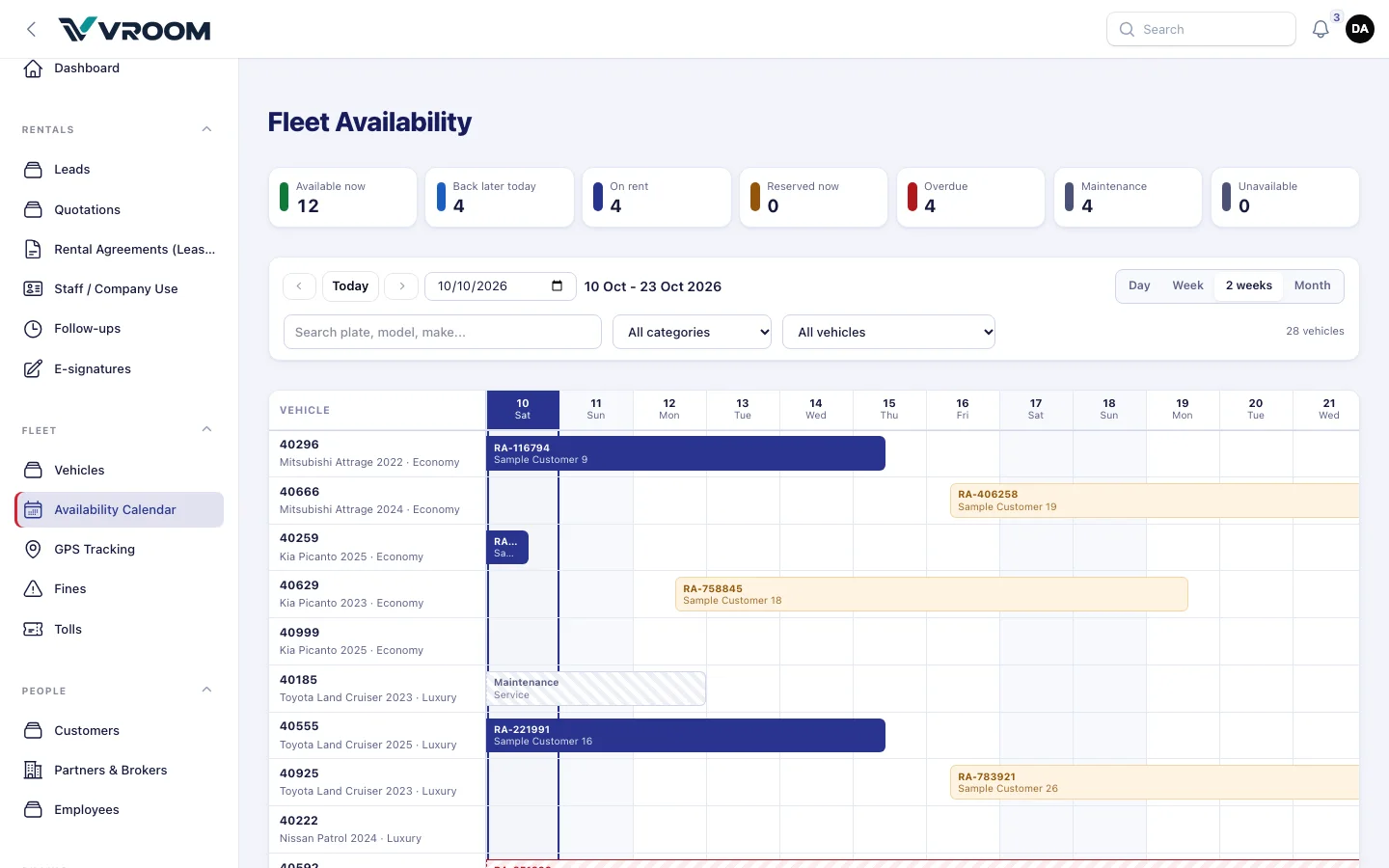
ScreenReal VROOM interface. Synthetic demonstration data; tenant branding replaced.
What you’re looking at
- 1State counters
The same figures as the dashboard and daily e-mail.
- 2Day, week, 2 weeks, month
Pick the period; move with Previous, Today and Next.
- 3Search and filters
Plate or model search, category, and free / booked / overdue / maintenance.
- 4On rent
Navy bars show agreement number and customer, pickup to return.
- 5Reserved
Amber bars are booked but not yet handed over.
- 6Maintenance
Hatched grey blocks the car for those dates.
Example workflow
- Pick the period
- Filter by category
- Click an empty cell
- Save — availability is re-checked inside a lock
04 · Rental agreements
Draft, Start, Return, Close
The agreement carries the booking, the hand-over, the return and the settlement.
- DraftBooked
- StartCar out
- ReturnCar back
- CloseSettled
- Vehicle
- Kia Picanto 2025 · 40259
- Pick-up
- 12 Oct, 10:00
- Expected return
- 15 Oct, 10:00
- Rate
- AED 120.00 / day · 3 days
- Km / fuel out
- 18,240 km · 3/4
- Allowed km
- 750 km
DemoIllustrative view with demonstration data, based on the documented workflow.
Highlights
- 1Lifecycle
Draft is the booking; Start records hand-over; Return frees the car; Close after settlement.
- 2Hand-over evidence
Kilometres and fuel out and in, condition notes and the signature.
- 3Deposit
Received, returned, retained or refunded — held, not revenue.
Example workflow
- Create the Draft from the calendar
- Start at hand-over
- Return when the car is back
- Invoice, settle, close
05 · Customers
One account per customer
Documents, rentals, invoices, payments, deposits, statements and follow-ups on one page.
| Date | Type | Number | Debit | Credit | Balance |
|---|---|---|---|---|---|
| 10 Oct | Invoice | INV-000229 | 1,260.00 | 1,260.00 | |
| 11 Oct | Payment | PAY-000116 | 1,260.00 | 0.00 | |
| 15 Oct | Invoice | INV-000231 | 378.00 | 378.00 |
Security deposits and broker-billed invoices are not part of this balance.
DemoIllustrative view with demonstration data, based on the documented workflow.
Highlights
- 1No duplicates
A mobile number already on file is refused.
- 2Statements
Balance forward, open items or transaction view, as PDF or print.
- 3Clean balance
Deposits and broker-billed invoices are kept out of the customer’s balance.
Example workflow
- Search the mobile number
- Create the customer
- Upload ID and licence
- Download a statement
06 · Invoices
Tax invoices from the agreement
Rental, Salik, parking and fines as lines, each with its own VAT type. One A4 layout for print, PDF, e-mail and WhatsApp.
| Description | Qty | Rate | Amount | VAT % | VAT |
|---|---|---|---|---|---|
| Rental — Kia Picanto 2025 (40259) | 3 | 120.00 | 360.00 | 5% | 18.00 |
| Traffic fine (recharge) Out of scope | 1 | 500.00 | 500.00 | 0% | 0.00 |
| Traffic fine admin charge | 1 | 50.00 | 50.00 | 5% | 2.50 |
this invoice
- Subtotal
- 910.00
- VAT
- 20.50
- Grand total
- 930.50
- Amount payable (AED)
- 930.50
DemoIllustrative view with demonstration data, based on the documented workflow.
Highlights
- 1Bilingual title band
TAX INVOICE / الفاتورة الضريبية with invoice, supply and due dates.
- 2VAT per line
Fines out of scope by default; admin charges standard-rated.
- 3QR verification
Opens a read-only page showing the invoice as first issued.
Example workflow
- Create from the agreement
- Add quick charges
- Save — it posts to the ledger
- Record payment
07 · Finance
VAT return, by period
Choose the FTA tax period and VROOM fills the boxes from your documents, then checks itself against the ledger.
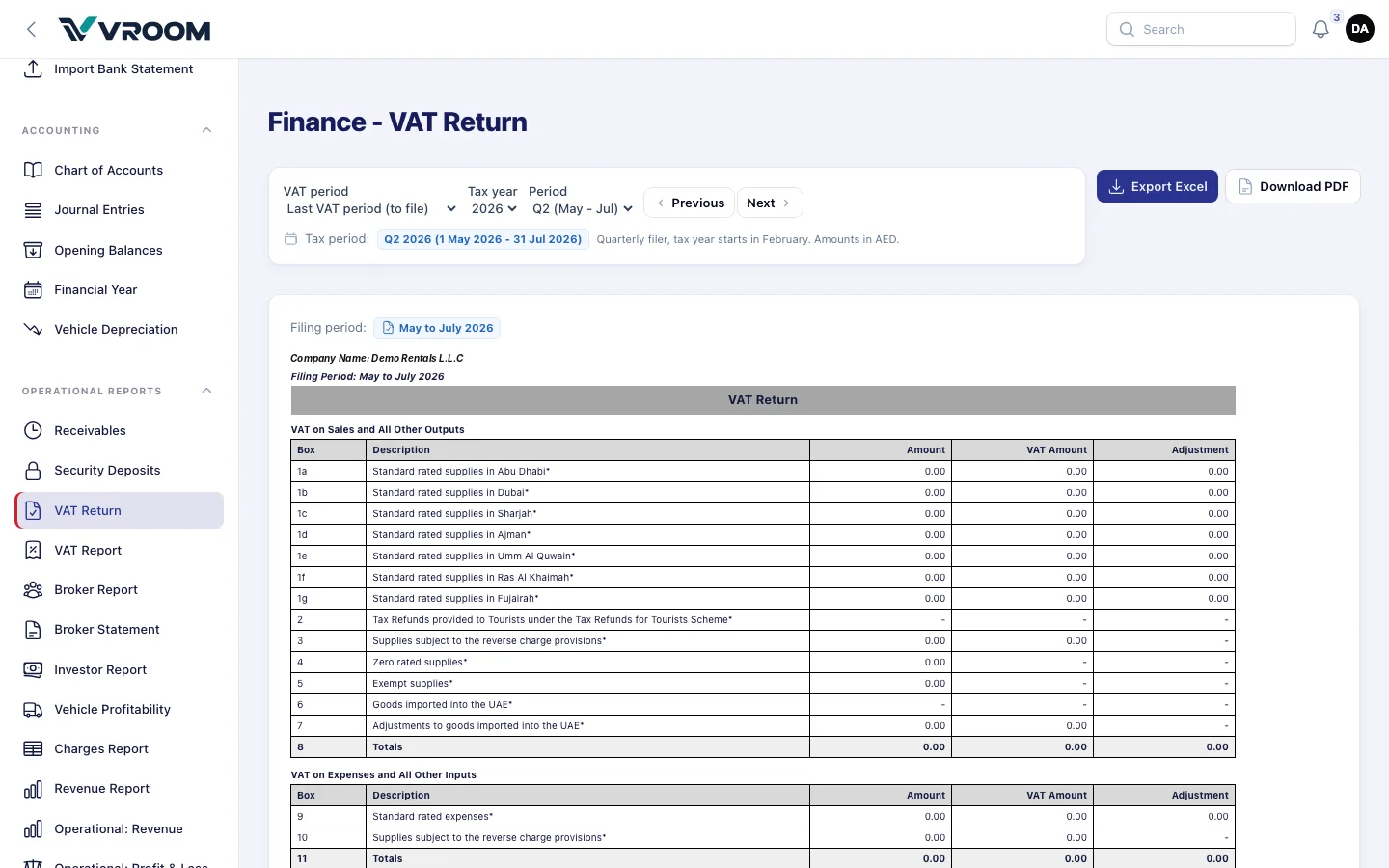
ScreenReal VROOM interface. Synthetic demonstration data; tenant branding replaced.
What you’re looking at
- 1VAT period
Last VAT period (to file), current period, or a tax year and period.
- 2Previous / Next
Move between your configured FTA periods.
- 3Tax period badge
Always shows exactly which period the figures cover.
- 4Export
Excel or A4 PDF.
- 5Boxes by emirate
Standard-rated supplies 1a–1g, zero-rated, exempt, totals and inputs.
Example workflow
- Set FTA periods once
- Pick the period
- Fix any 0% lines flagged for review
- Check against the ledger and export
08 · GPS tracking
Pilot GPS, inside VROOM
With an authorised Pilot GPS connection, see status, location, trips and events next to the vehicle record.
- 40296Mitsubishi Attrage 2022Moving64 km/h
- 40555Toyota Land Cruiser 2025Idling6 min
- 40925Toyota Land Cruiser 2023ParkedMain branch
- 40111Mitsubishi Pajero 2025Moving48 km/h
- Odometer
- 48,212 km
- Fuel
- 62%
- Trips today
- 3
- Idling today
- 14 min
- 09:42Left geofence · Main branch
- 10:18Stop · 12 min
- 10:31Trip started
- 10:55Moving · 64 km/h
DemoIllustrative view with demonstration data, based on the documented workflow.
Highlights
- 1Vehicle list
Moving, idling or parked, with speed or duration.
- 2Geofences
Know when cars enter or leave your branches and zones.
- 3Timeline
Trips, stops and events for the selected vehicle.
Example workflow
- Connect Pilot GPS (configuration required)
- Match tracked units to vehicles
- Track from Fleet › GPS Tracking
09 · AI assistant
Ask in plain language
Try the predefined questions. The assistant answers within the user’s permissions and asks before changing anything.
Hello Demo. I can look things up and prepare actions you are allowed to take. Pick a question below.
DemoIllustrative view with demonstration data, based on the documented workflow.
Highlights
- 1Supported actions only
No unrestricted access to your data.
- 2Confirmation
Drafts and messages wait for staff approval.
- 3Assistant Log
Administrators can review activity.
Example workflow
- Ask a question
- Review the answer or prepared action
- Confirm or cancel