Connected tools · User roles & security
Everyone sees what their job needs. Nothing more.
Permissions are set per role and enforced on the server. A hidden button is also blocked behind the scenes, so typing a page address directly is refused.
| Role | Rentals | Fleet | Billing | Finance | System |
|---|---|---|---|---|---|
| Super Admin | Full | Full | Full | Full | Full |
| Owner | Full | Full | Full | Full | View |
| Admin / Manager | Full | Full | Full | View | As permitted |
| Accountant | No access | No access | Full | Full | No access |
| Rental / Sales agent | Full | View | As permitted | No access | No access |
| Fleet manager | No access | Full | No access | No access | No access |
| Viewer | View | View | View | No access | No access |
| Investor | Separate investor portal — own statements only | ||||
What it does for you
What changes for your team
Roles that match your team
Super Admin, Owner, Admin / Manager, Accountant, Rental / Sales agent, Fleet manager and Viewer — each with a sensible default scope.
Investors kept outside
Investor logins are created only from the investor’s page and only ever reach the separate investor portal with their own statements.
A complete audit trail
Financial records, exports, document downloads, branding and settings changes are recorded with who, when and what changed.
Sign-ins watched
Login history shows successful and failed sign-ins. Repeated failures are throttled per account and per address.
How it works
Good access practice, built in
One login per person
Create staff logins in System › Users & Access and assign a role.
Finance stays with finance
Give financial permissions only to finance staff.
Owners approve
Write-offs and settlements need owner-level approval.
Remove leavers the same day
Deactivate access as soon as someone leaves.
Also included
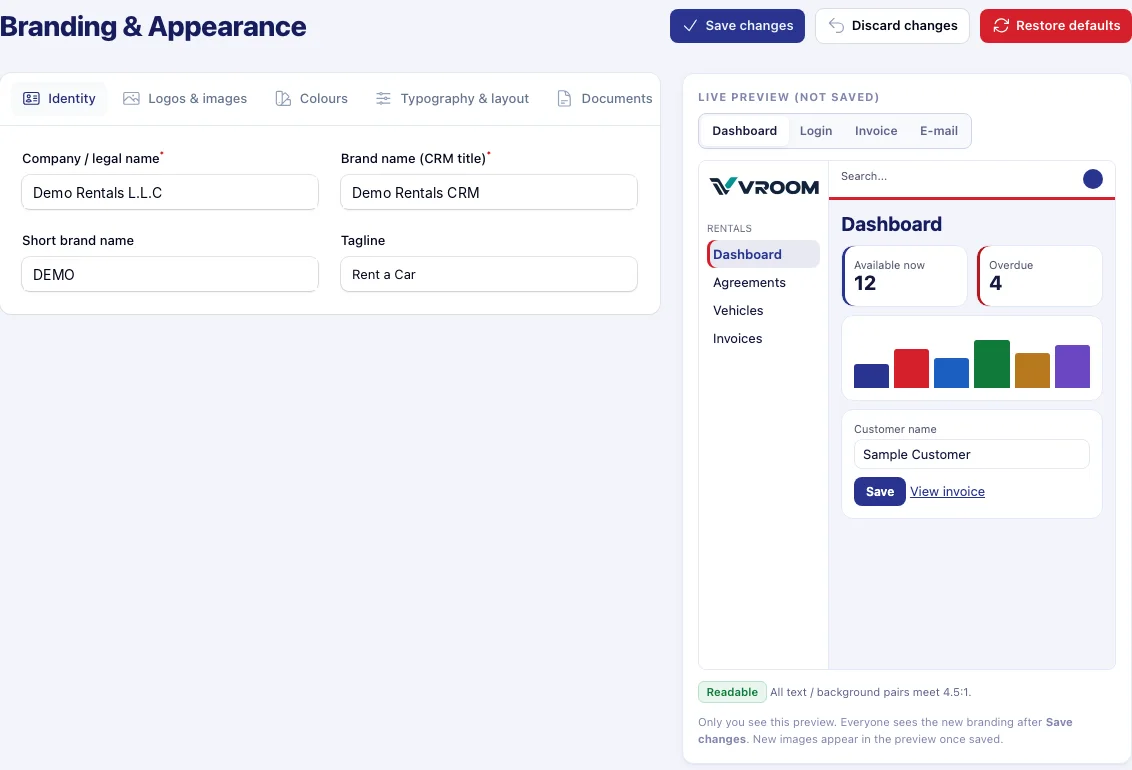
Your brand on every screen and document
One Branding & Appearance page re-brands the CRM, investor portal, login page, e-mails and printed documents — with a private live preview and contrast checks before anything is saved.
In detail
What’s included
Default roles
- Super Admin — everything, including financial year and VAT settings
- Owner — sees everything, approves write-offs and settlements
- Admin / Manager — operations and finance reports
- Accountant — finance, journals, bills, VAT, exports
- Rental / Sales agent — customers, quotations, agreements, invoices and payments as permitted
- Fleet manager — vehicles, maintenance, fines, tolls
- Viewer — read-only, no financial reports unless granted
- Investor — separate portal, own statements only
Protection in place
- Server-side permission checks (403 on direct addresses)
- Sensitive-document permission for identity files
- Audit trail for financial records, exports and settings
- Login history and throttling
- Readable-colour checks on branding
- SVG uploads cleaned of scripts and links
VROOM is built with these controls, but we do not claim third-party security certifications. Ask us for details of hosting and backup arrangements for your installation.
Questions
User Roles & Security: common questions
Something else? Ask our team or read the Help Center.
Can I create custom roles?
Permissions are managed per role in System › Users & Access. Talk to us about the role structure your business needs.
Can posted accounting history be deleted?
No. Posted accounting history is never deleted; corrections are made by reversal.
Connected to
Works hand in hand with
Next step
See your own rental workflow in VROOM.
Book a live demo and we will walk through a rental from booking to the financial statements, using demonstration data.