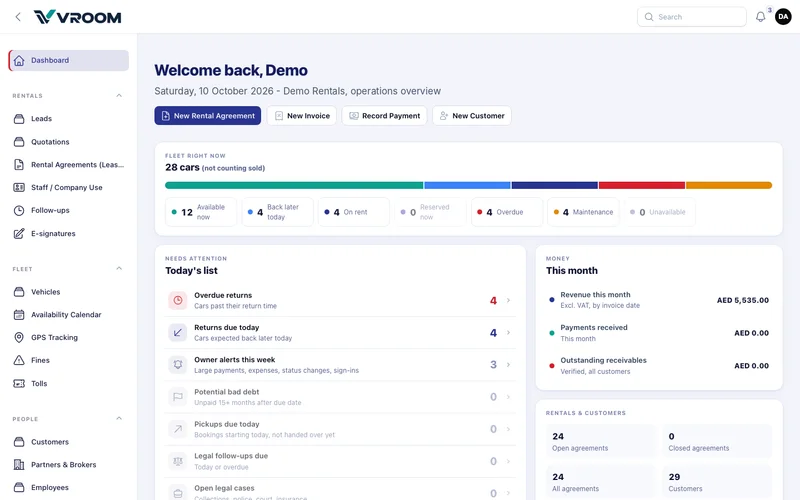
Quick actions
The buttons at the top start the four most common tasks: New Rental Agreement, New Invoice, Record Payment and New Customer.
Fleet right now
The coloured bar splits your fleet (not counting sold cars) into Available now, Back later today, On rent, Reserved now, Overdue, Maintenance and Unavailable. These are the same figures as the availability calendar and the daily fleet e-mail. Open a segment to see the matching cars.
A car that is expected back later today is not available now. Overdue vehicles stay blocked until the return is recorded.
Today’s list
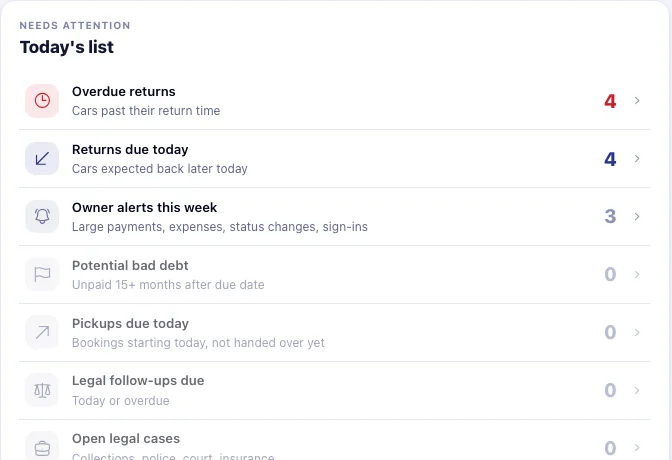
- Overdue returns — cars past their return time. Act on these first.
- Returns due today — cars expected back later today.
- Owner alerts this week — large payments, expenses, status changes and sign-ins.
- Potential bad debt — unpaid 15+ months after the due date.
- Pickups due today — bookings starting today that have not been handed over.
- Legal follow-ups due and Open legal cases.
Money this month
Revenue this month (excluding VAT, by invoice date), payments received this month, and outstanding receivables for all customers.
A normal day at the counter
- Open Dashboard › Today’s list and review pickups, returns and overdue returns.
- When a customer collects a car, open the booking and press Start. Record the hand-over details, deposit and signature.
- When a car comes back, open its agreement and press Return. Enter kilometres, fuel and damage or condition notes.
- Create the invoice from the agreement, record the payment and attach the receipt through Documents › Upload files.
- Review the next daily fleet report.