Every morning the administration team can receive which cars are available now, which are expected back today, and which are on rent, overdue or off the road — by e-mail, and by WhatsApp as a PDF attachment. The two channels are independent: each has its own switch, recipients and send time.
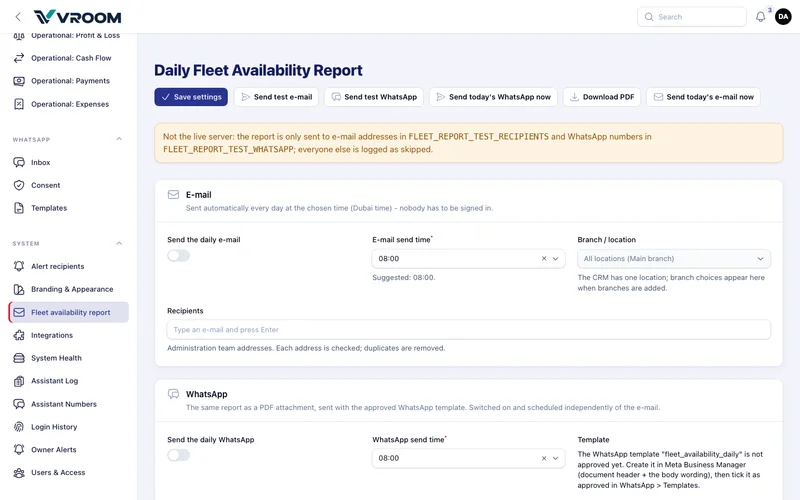
Set up the e-mail
- Go to System › Fleet availability report.
- Switch on Send the daily e-mail.
- Choose Send at (Dubai time; 08:00 is suggested).
- Add Recipients: type an address and press Enter. Invalid addresses are refused and duplicates removed.
- Choose the extra sections: on rent / reserved, overdue, maintenance / unavailable.
- Press Save settings, then Send test e-mail to yourself.
What the e-mail contains
- The report date and time, the location and the total fleet.
- A count for each state.
- A table of cars Available now, with plate, vehicle, category, location, available from and, if booked later today, booked from.
- Expected to become available today, with the due-back time.
- Optional tables for overdue, on rent / reserved, and maintenance.
No customer details are included. A button opens the calendar (sign-in required).
- Template approval (one time, required by Meta). Create a Utility template in Meta Business Manager with a document header and a body with two variables: the report date and the number available. When Meta approves it, open WhatsApp › Templates, check the name and language match exactly, and tick Approved. Until then, every WhatsApp attempt is logged as skipped.
- Switch on Send the daily WhatsApp, choose the send time, and add the numbers of staff who have agreed to receive the report. Use international format, for example +971501234567. Local numbers starting 05 are refused rather than guessed.
- Save, then Send test WhatsApp to your own number. Download PDF shows exactly what recipients receive.
WhatsApp delivery needs the live WhatsApp connection (official Meta Cloud API). Until it is connected, nothing leaves the server.
Reliability
- It is sent once a day. A missed time is caught up later the same day.
- Each send is tried 3 times and retried up to 5 times a day. Every attempt appears in Delivery history.
- If mail is not configured, the page shows a red warning and attempts are logged as failed. Nothing fails silently.
- Send today’s report now sends immediately; the scheduled report still goes out at its time.