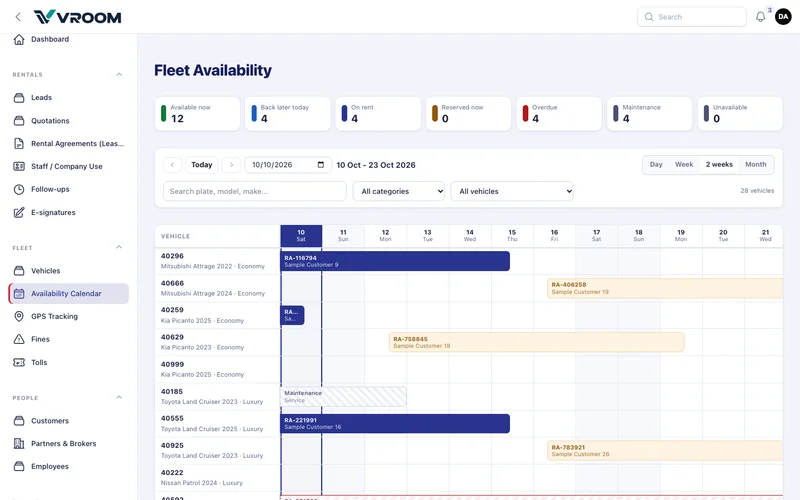
Fleet › Availability Calendar shows every car’s bookings on a timeline and lets you start a booking in one click. Booking from the calendar needs permission to create rentals.
Step by step
- Pick the period: Day (hour by hour), Week, 2 weeks or Month. Use Previous / Today / Next or the date box to move.
- Narrow the list: type part of a plate or model, choose a category, or choose what to show — free for the whole range, booked in range, overdue, or maintenance / unavailable.
- Read the bars. Each bar shows the agreement number and customer, from the real pickup time to the real or expected return time (Dubai time).
- Click a bar to open the agreement. Click an empty cell to start a new agreement for that car, with the day already filled in.
| Bar | Meaning |
|---|---|
| Navy | On rent |
| Amber | Reserved (booked, not yet handed over) |
| Red hatched, running to the edge | Overdue: still with the customer, blocked until the return is recorded |
| Grey hatched | Maintenance |
| Grey | Returned (history) |
| Dashed edge | Continues before or after the visible range |
The rules the calendar follows
- Back-to-back bookings are allowed. A return at 10:00 and a new pickup at 10:00 do not overlap.
- Overdue cars stay blocked for any later date until the return is recorded. The expected date passing never frees the car.
- Every save is re-checked inside a lock, so two people cannot book the same car at the same moment.
On a phone
The figures become a swipeable strip, and the timeline scrolls sideways while the vehicle column stays in place.
Troubleshooting
- “The car shows as overdue but it is in the yard.” Record the return on the agreement.
- “I cannot click a day.” The day is in the past, the car is on a manual hold, or your role cannot create rentals.